


Fluza: AI Language Tutor
4.931.00 Reviews
App Specs
- Version
- 1.6.0
- Updated On
- License
- Free
- Downloads
- 1,000,000+
- Developer
- Vit Corp.
- Categories
- Education
- Platform
- Android
Screenshots


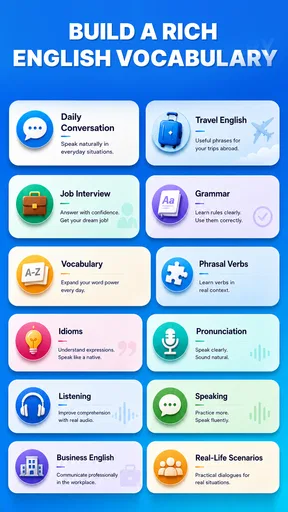
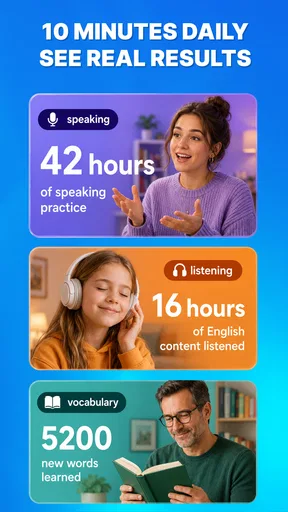
 Analysis by AppCompare
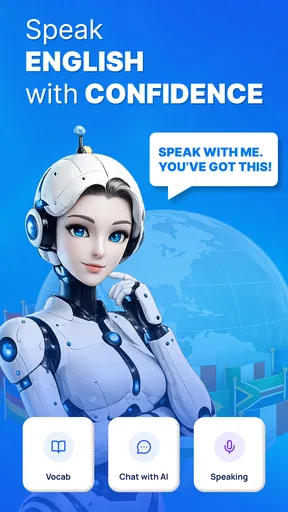
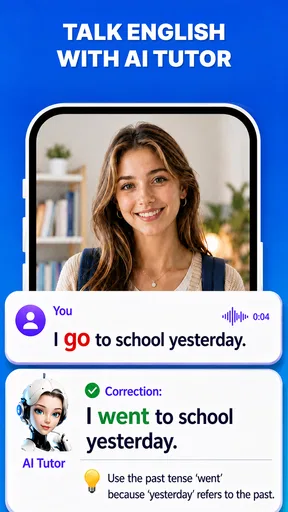
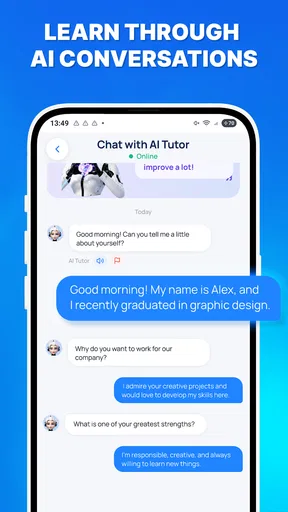
I would treat Fluza: AI Language Tutor as a way to make language practice easier to start, rather than as a complete course in your pocket. Its central idea is an AI coach that responds to practice with quick feedback, which suits the moments when you have a few minutes and want to try forming a sentence instead of passively reviewing vocabulary. That can be especially useful if you understand more than you feel comfortable saying.
In my view, the most important question is not whether an AI can replace a teacher. It is whether you will actually use the feedback to try again. If you are willing to pause, notice what changed, and repeat a corrected phrase in your own words, this education app has a practical role. If you want a fixed syllabus, detailed grammar lessons, or human conversation, you will probably want to pair it with something else.
Getting past the first-session friction
I find the first few minutes matter most with an open-ended tutor: a specific situation gives the coach something useful to respond to and gives me a clear way to judge the result. In this section, I focus on making that first attempt manageable and turning a correction into a second try, rather than expecting one exchange to teach everything. That small shift can make the difference between a confusing start and a practice habit worth keeping.
Start with a small, clear goal
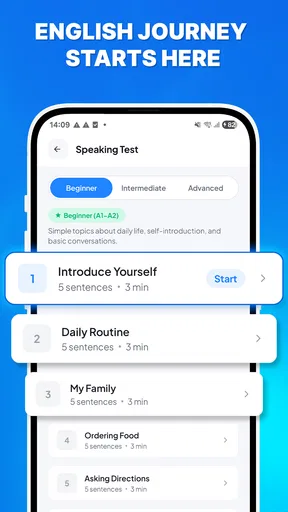
Apps built around AI practice can feel open-ended: you know you want to learn, but not what to say first. I recommend beginning with a concrete situation, such as introducing yourself, asking for directions, or explaining what you need at a shop. A narrow goal gives you a useful way to judge whether a practice session helped, and it is less intimidating than trying to “learn the language” all at once.
Keep your first attempt short. A simple sentence gives you room to focus on the feedback instead of juggling several unfamiliar ideas. Then make one deliberate change and try again. This is a better test of whether the coach’s response is useful than entering a long paragraph and skimming a list of corrections.
Make feedback a loop, not a score
The most valuable habit with an AI language tutor is to turn each correction into another attempt. Read the response, identify one point you can apply, and produce a fresh version without copying the original word for word. For example, after practising a polite request, try expressing a different request with the same structure. That checks whether you have picked up a reusable pattern rather than merely accepted a one-off edit.
There is a trade-off here: instant responses make it easy to keep moving, but speed can encourage you to accept suggestions without thinking. I would treat the coach as a practice partner, not an authority whose every phrasing is automatically the only natural option. If a response is unclear, ask yourself what you were trying to communicate and try a simpler version before adding complexity.
Worth Reading Before You Choose

EA SPORTS FC Mobile 26 Is a Bigger Football Game, but It Takes Time

Flipboard Shows What News Apps Must Do Beyond the Feed

Switching to Android Auto Means Rethinking Your Driving Routine

Google Calendar Makes a Crowded Week Easier to Manage

Ludo King Makes the Most of the Minutes Between Plans

Baby Panda World Brings Quick Play to Modern Phones, but Its Game Library Feels Busy
Use an everyday scenario to make practice stick
A realistic routine might be a few minutes before a commute or during a quiet break. Pick one upcoming interaction—ordering lunch, greeting a colleague, or asking someone to repeat a sentence—and practise the lines you might need. Later, recall the useful phrase without looking at the previous exchange. That small retrieval step makes the session more than a pleasant chat with an AI.
This approach also helps you notice gaps that ordinary flashcards can hide. You may recognise a word when it appears on a screen but struggle to place it in a request. Practising the whole thought exposes that problem earlier. I would keep a separate note of phrases that matter to your own life, especially if you are learning for travel, work, or family conversations.
Setup checks and a dependable practice routine
I would check the device requirement and connection before assuming a stalled session reflects the coaching itself, then keep a session short enough to recover easily if the response misses my meaning. Here I cover simple ways to narrow a prompt, retry a sentence, and carry one useful phrase into later practice. A repeatable routine also makes it easier to decide whether the friction comes from the app, the task, or the learning point.
Check the basics before blaming the coach
Fluza is published by Vit Corp. and is free to install, with optional in-app purchases priced from $3.49 to $69.99 per item. Before paying for anything, I would first establish whether the free experience suits your routine and whether the app is comfortable to use for the kind of practice you want. The presence of purchases does not by itself tell you which functions are included, so check the current in-app purchase details on your device before committing.
The listed minimum operating system is version 8.0. If installation or opening is troublesome, check that your device meets that requirement, then make sure the app has finished installing and that your device has a working connection when you try to use its AI coaching. These are basic checks, not a promise that every problem has the same cause. If the app still behaves unexpectedly, closing and reopening it and trying again later are sensible first steps.
It is also worth giving yourself a quiet moment for a first session. Language practice is harder when you are rushing or distracted, and an unclear first attempt can make feedback seem less helpful than it is. Begin with an uncomplicated sentence and see whether you can understand the response. If you cannot, simplify the task rather than immediately concluding that the whole app is unsuitable.
Recover when a session goes off track
If you receive feedback that seems unrelated to what you meant, restate the idea in fewer words. Keep one meaning per sentence, especially while you are still learning basic structures. This makes it easier to work out whether the difficulty came from your wording or from a mismatch in the response. It is a practical troubleshooting habit that also improves language practice, regardless of the specific source of confusion.
When a correction feels too broad, do not try to repair every part of your sentence at once. Make a clean second attempt with the same meaning, changing only the part you think caused trouble. If the answer still does not help, switch to a more familiar example and return to the original idea later. That prevents one awkward exchange from consuming the whole session.
A useful workflow is to finish each practice session by choosing one phrase worth remembering and one question you still have. The phrase becomes material for later recall; the question can be checked in a grammar reference, class, or conversation with a fluent speaker. This keeps Fluza in a sensible supporting role and reduces the risk of treating a single AI response as a complete explanation.
Separate app friction from learning friction
Not every frustrating session points to a technical problem. Sometimes the prompt is too ambitious, the sentence contains too many unfamiliar words, or you are tired and trying to practise without enough attention. In those cases, a shorter exercise is likely to help more than repeatedly restarting. If the problem is that you do not understand the language point itself, an explanation from a textbook or teacher may be clearer than another conversational attempt.
On the other hand, if the app does not open or a session cannot proceed, first check the device requirement and connection, then try again after reopening the app. If the issue persists, use the app’s available support route rather than guessing at a fix. I would avoid deleting anything or changing device settings without a clear reason, particularly if you have work you want to keep.
Know what the rating can and cannot tell you
Fluza has a 4.9 average from around 6,900 ratings, with more than 1 million installs and 31 written reviews. Those figures suggest that many people have tried it and that the overall response is positive, but they cannot tell you whether its coaching style matches your level or goals. I would use the first sessions as the real test: can you understand the feedback, act on it, and return for another short practice?
The app is free, carries an Everyone age rating, and is currently at version 1.6.0. Those details help set expectations about access and compatibility, but they do not answer whether it replaces a structured course. For a learner who wants a planned progression, I would still use a course or teacher to organise what comes next, and use AI practice to make that material easier to produce aloud or in writing.
Who should use it, and when another tool is better
I see Fluza as most useful for learners who want a low-pressure place to try forming their own sentences, especially between lessons or alongside other study. This section weighs that role against flashcards, structured courses, and human conversation, so the choice depends on what kind of help you need next. If a planned curriculum, specialist correction, or real cultural exchange is the priority, another tool may serve you better.
Where it fits among language-learning options
Compared with flashcard apps, Fluza’s conversational coaching is more suited to assembling words into a message than memorising isolated terms. Compared with a traditional course, it is less naturally suited to providing a carefully sequenced path through grammar and topics. And compared with a human tutor or language exchange, AI practice offers a low-pressure way to try phrasing, but it cannot provide the same personal judgment, cultural nuance, or genuine back-and-forth with another person.
That difference makes the strongest workflow a combination. Use a course, class, or reference to understand a topic; use Fluza to practise expressing it; then use real conversation to see how well it holds up. For independent learners who already have study materials, the app can fill the uncomfortable gap between recognising a rule and attempting to use it. For complete beginners who need every concept introduced in order, a structured program is likely a better foundation.
Who will get the most from it
I can see Fluza working well for learners who hesitate to speak or write because they are afraid of making mistakes. The AI format gives you a place to rehearse, and quick feedback can make a practice session feel less like a test. It is also a reasonable fit for someone with an irregular schedule who wants to practise in short bursts rather than wait for a lesson or conversation partner.
It is less compelling if your main need is pronunciation coaching with detailed sound-by-sound instruction, a complete beginner curriculum, or guaranteed expert correction. Those needs call for a tool or person designed specifically around them. Likewise, if you prefer learning through carefully explained rules and exercises, an open-ended coaching exchange may feel less organised than you want.
One final practical point: do not measure progress only by how polished a single AI-assisted answer becomes. Measure whether you can later produce the same kind of sentence on a new topic without relying on the old response. That is where a coaching app proves its value, and it is also where a learner can discover that extra study is needed.
My practical verdict
Fluza: AI Language Tutor makes most sense as a low-pressure practice companion, not as the only resource in a language-learning plan. I like the emphasis on trying to communicate and receiving feedback quickly, especially for learners who need a nudge to move beyond passive study. Its best use is focused: bring a real situation, keep your attempt manageable, and use the response to make another attempt.
The friction is equally worth keeping in mind. Open-ended practice can leave you unsure what to do next, and AI feedback is not a substitute for a clear course or a human conversation. If you are comfortable supplementing it with those resources, the free starting point makes it easy to see whether this style suits you; just review the purchase options before spending. I would recommend giving it a try if your biggest obstacle is practising regularly, while choosing a more structured or human-led option if you need a curriculum, specialist instruction, or deeper personal feedback.
Pros
- Offers AI-powered conversation practice for building speaking confidence.
- Lets learners practice at their own pace and on their own schedule.
- Can provide a low-pressure alternative to speaking with other learners.
- Useful for practicing everyday scenarios and conversational language.
- May help learners spot gaps in vocabulary during practice.
Cons
- AI responses may occasionally sound unnatural or miss the intended meaning.
- Speaking practice depends on having a working microphone and a quiet setting.
- Feedback may not catch every grammar or pronunciation mistake.
- The app may not offer enough depth for advanced or specialized language study.
- Some features or practice time may require a paid plan.
FAQs for Fluza: AI Language Tutor
What is Fluza: AI Language Tutor, and how does it help you learn?
Fluza: AI Language Tutor is a language-learning app centered on AI-assisted practice. It is designed to help learners build skills through interactive activities and conversations rather than relying only on passive study. The exact tools and lesson formats may vary by version, so check the app’s current listing to see which languages, practice modes, and learning features are available before downloading.
Which languages can I study with Fluza?
The languages available in Fluza may depend on the app version and the learning options currently offered. Before starting, look in the app or its store listing for the supported languages and confirm that your preferred language is available for your chosen learning direction. Also check whether instructions or interface text are offered in a language you understand, especially if you are a beginner.
Is Fluza suitable for beginners, or do I need prior language experience?
An AI tutor can be useful for learners at different stages, but suitability depends on Fluza’s available lessons, difficulty settings, and guidance. Beginners may want clear explanations and structured practice, while more advanced learners may prefer open-ended conversation. Review the app’s description and try an introductory activity, if available, to judge whether its pace and feedback match your needs.
Is Fluza free, and does it require a subscription or in-app purchases?
The cost of using Fluza can depend on its current pricing model, region, and any introductory offer. Check the store listing and the app’s purchase screen for details about free access, subscription plans, trial periods, and in-app purchases before signing up. If you start a trial, note its renewal date and cancellation terms so you are not surprised by a future charge.
Does Fluza require an internet connection, and what should I know about privacy?
AI-powered language practice commonly relies on an internet connection, so some Fluza features may not work offline; confirm this in the app before relying on it while traveling. Since you may enter text or speak during practice, read the privacy policy and permission requests to understand how voice recordings, messages, and other data are handled. Avoid sharing sensitive personal information in conversations.


